

Review comments rarely stay inside neat, isolated threads.
A terminology change on page 2 may affect a liability clause on page 17. A legal restriction in one annotation may conflict with a product decision somewhere else. A reviewer may simply need to say, “This is the same issue as #4; do not fix it twice.”
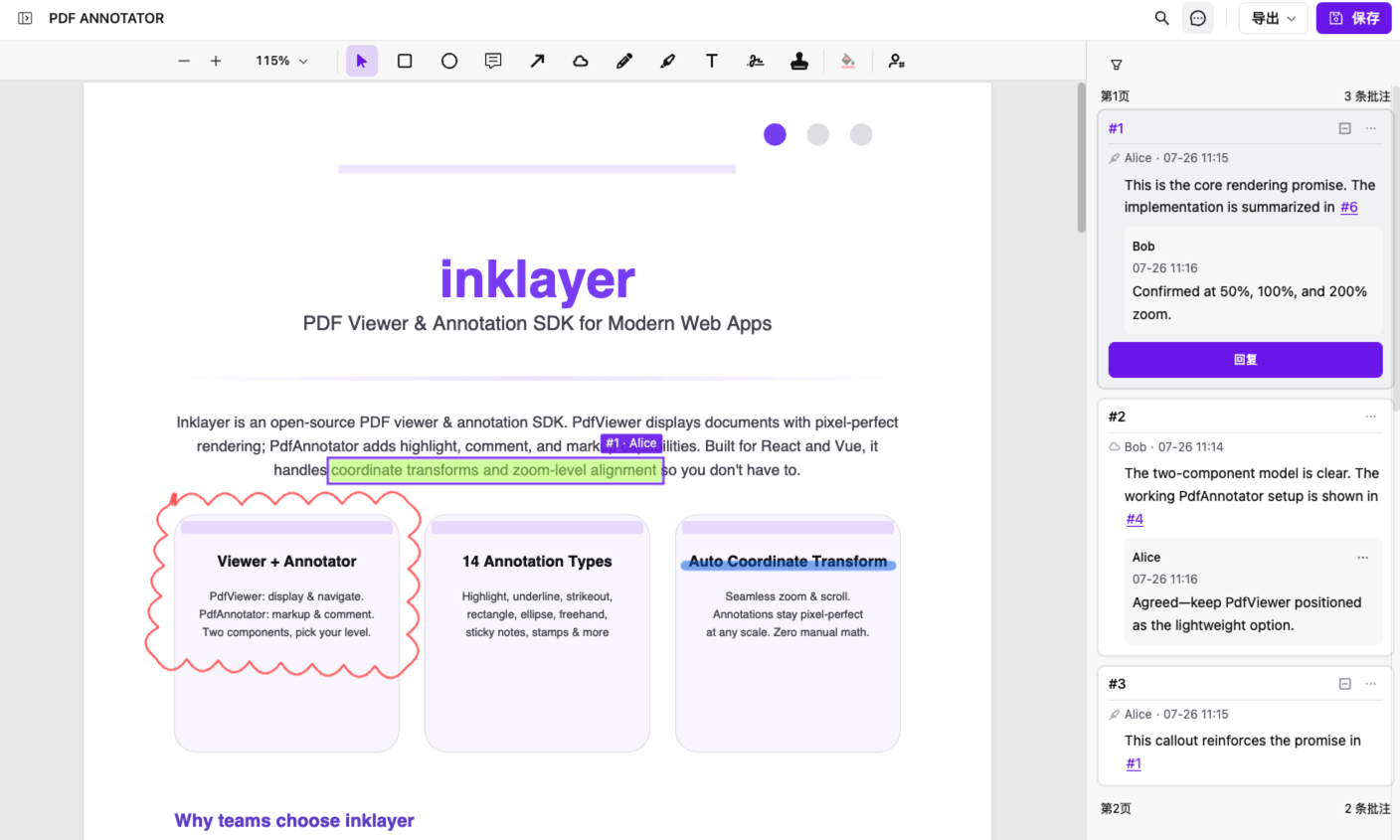
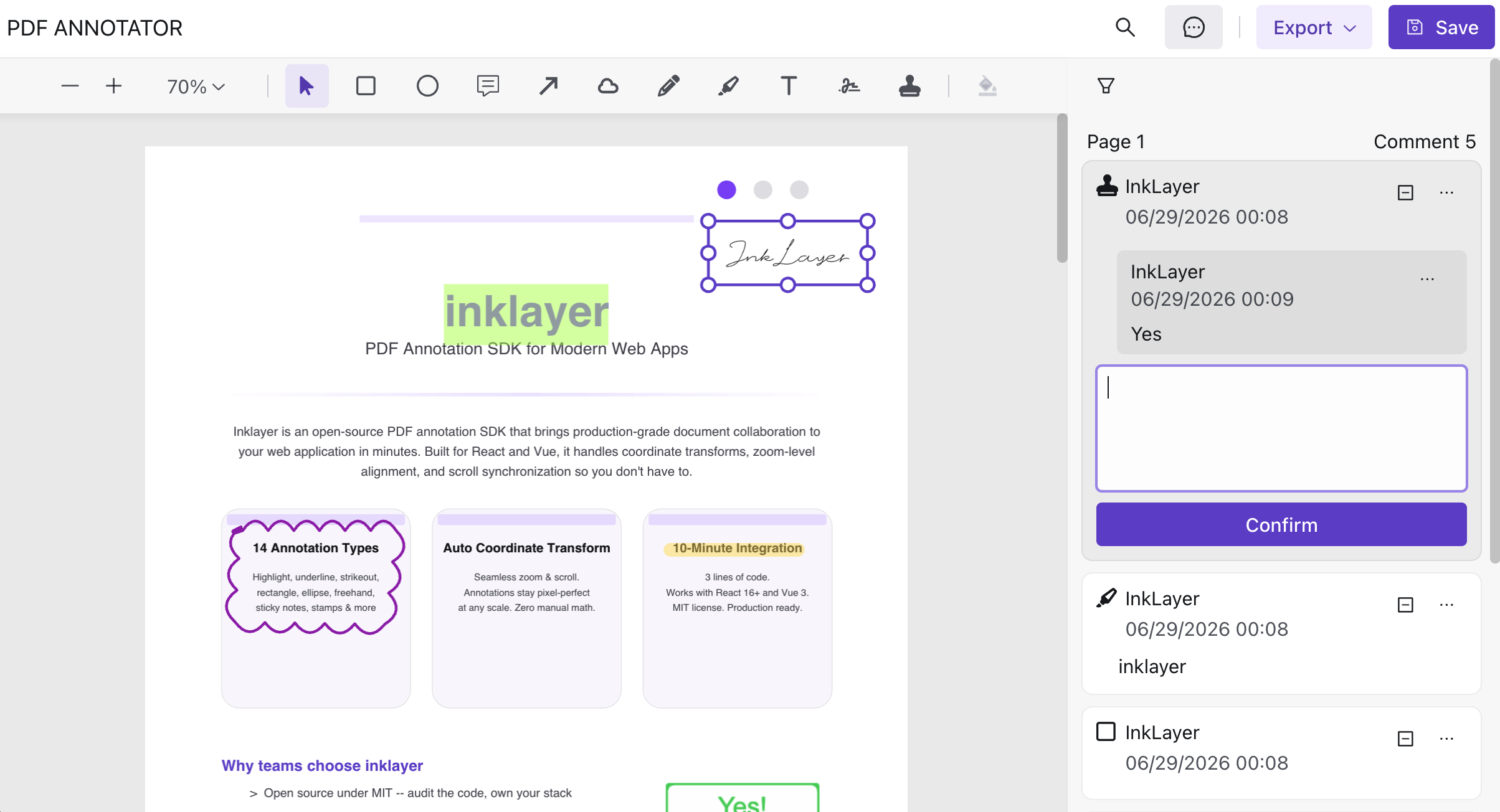
Replies are good at continuing the discussion around one annotation. They are much less effective at expressing a relationship between separate annotations. That is why InkLayer 1.2.0 introduces # annotation references:
Replies keep one discussion together. References connect different review issues.
Why comment threads are not enough
Most PDF review tools organize annotations as separate trees:
Annotation #1
├── Reply
└── Reply

Annotation #2
└── Reply
This model answers a useful question: “What did everyone say about this issue?” Real reviews, however, are closer to a graph:
#4 conflicts with #1
#7 adds evidence for #3
#12 depends on the change in #6
#18 duplicates #9
When the product can only represent parent comments and replies, reviewers fall back on fragile workarounds:
- “See the comment in the bottom-right corner of page 12,” even though pagination and layout may change;
- copying another annotation in full, creating duplicated content that can drift out of sync;
- explaining relationships in chat, separating the decision trail from the document;
- writing “same as above” and leaving the next reviewer to find the missing context.
The missing piece is not another comment box. It is a stable link to another review item.
What existing PDF review tools already do well
As of July 2026, we reviewed publicly available official documentation for several PDF SDKs, desktop review tools, and open-source components. The standard collaboration toolbox is already mature:
| Product or category | Collaboration capabilities documented by the vendor |
|---|---|
| Apryse WebViewer | Annotation numbering, @ mentions in comments, and an API for jumping to a selected annotation |
| Nutrient Web SDK | Comment threads, replies, and @ mentions |
| Adobe Acrobat | Comment replies and reviewer mentions |
| Syncfusion PDF Viewer | Comments, replies, review status, and annotation filtering |
| Bluebeam Revu | Markups List, author and status tracking, comments, filters, and export |
| PDF-XChange Editor | Comments pane, replies, status, and annotation navigation |
| Rendering-focused libraries such as React-PDF | PDF rendering or display of an existing annotation layer; application-level collaboration is usually left to the implementer |
These features solve different problems: who needs attention, how a single conversation continues, how to locate an annotation, and how to manage a large review set. Apryse, for example, documents annotation numbering, @ mentions, and jumpToAnnotation as separate capabilities. Nutrient and Adobe Acrobat also document replies and mentions.
What we did not find in those publicly searchable official guides was a complete built-in flow for typing # in an annotation or reply, selecting another annotation, previewing its context on hover, and clicking to navigate across pages. This describes the public documentation we reviewed; it is not a claim that no product or implementation can offer something similar.
Comparison scope: This comparison reflects publicly available official documentation reviewed on July 30, 2026. Capabilities may vary by product version, plan, or custom configuration. Product names are used only to identify the products discussed; no affiliation or endorsement is implied.
The distinction matters: mentions connect people, replies connect conversations, and annotation references connect review items.
Five collaboration problems # references solve
1. Cross-page context becomes precise
“See my earlier note about the liability cap” forces the reader to search. “This conflicts with #4” supplies a concrete target. A reviewer can preview that target first, then click to navigate to it even when it lives on another page.
2. Duplicate and conflicting feedback becomes visible
Parallel review naturally creates duplicate comments. Syncfusion’s comments guide explicitly describes comments as a way to prevent duplicated or conflicting feedback. Its annotation filtering example uses five participants and more than 100 annotations to illustrate the management problem in a dense review.
References let reviewers preserve each observation while declaring the relationship:
- “Duplicate of #9; track the fix there.”
- “This can close after we adopt the proposal in #6.”
- “#3 was changed, but it does not resolve this risk.”
A reference does not remove disagreement. It makes disagreement explicit and traceable.
3. The rationale survives the final status
“Resolved” tells you the outcome, but not why the team chose it. References can connect a concern, supporting evidence, and the final decision:
#3 raises a risk
  ↓
#7 provides regulatory evidence
  ↓
#12 records the final change and references #3 and #7
During a later audit, handoff, or second-round review, that decision chain can be more valuable than a standalone “done” label.
4. Handoffs require less oral history
Contracts, specifications, engineering drawings, and compliance documents often pass through product, finance, legal, engineering, and external clients. People joining later did not hear the earlier conversations. References preserve the important relationships inside the document context instead of relying on meetings and chat history.
5. A reference is more stable than a page description
A page number identifies a page; a reference identifies a specific annotation. InkLayer also stores the stable target annotation ID alongside the human-readable #4 label, so display numbering is not confused with navigation identity.
Conceptually, a reference carries data like this:
{
  "type": "annotation",
  "annotationId": "stable-target-id",
  "label": "#4"
}
The label is for people. The annotationId resolves the target. Reordering the UI should never require parsing a number out of plain text and guessing what it means.
A concrete contract review example
Imagine a 30-page procurement contract being reviewed by product, finance, and legal:
- Legal creates #1 on page 4: liability must be capped at the contract value.
- Finance finds an unlimited indemnity clause on page 18, creates #4, and writes: “This conflicts with #1.”
- Product revises a service commitment on page 22 and replies: “Updated based on #4; please recheck #1.”
- Legal hovers over #1 or #4 to confirm the context, then clicks through to the target page for final review.
Without references, this exchange often degrades into “look at that earlier legal comment” or moves into a team chat. With references, every observation remains attached to its own location while still participating in a connected review.
The # syntax is useful precisely because it is compact and familiar. Developers already understand GitHub’s autolinked issue and pull request references, such as #26: readable in plain text, but interactive when the application understands it.
How annotation references work in InkLayer 1.2.0
InkLayer React and InkLayer Vue 1.2.0 share the same interaction:
- Type
#in an annotation body or reply. - Choose the target annotation from the suggestion list.
- The saved reference appears as a readable
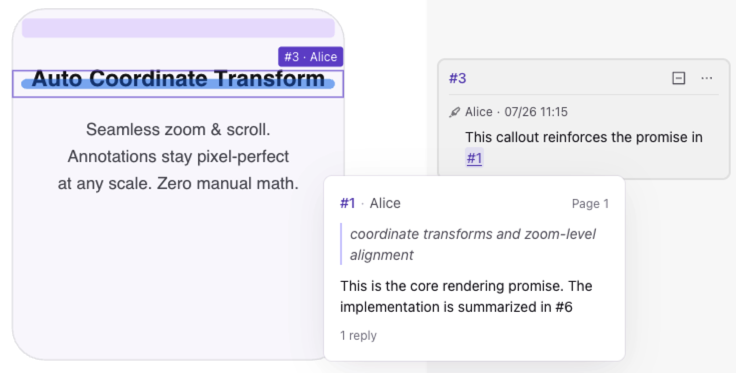
#numbertoken. - Hover over it to preview the target author, page, selected text, and reply context.
- Click it to select the target annotation and navigate to its page.
If the target no longer exists, InkLayer renders the reference as unavailable instead of silently navigating somewhere incorrect. Broken-target behavior matters in auditable review workflows: the UI should reveal that a relationship has been lost.
About PDF export: Annotation references are structured application data. The visible comment text can remain after export, but hover previews and cross-page navigation require a viewer that understands InkLayer’s reference data.
References, replies, and permissions belong together
References do not replace replies, and they must not bypass authorization.
| Capability | The question it answers |
|---|---|
| Reply | How does discussion around this one issue continue? |
@ mention | Who needs to see or handle it? |
# reference | Which other review item is related? |
| Permission | Who may view, reply to, edit, or delete it? |
An application integrating references should at least:
- show only reference candidates the current user may access;
- re-check document and target-annotation access when a reference is opened;
- preserve an explicit unavailable state after a target is deleted;
- store the structured target ID on the backend, not only the visible
#4text; - distinguish “you were mentioned” from “your annotation was referenced” in notifications to avoid noise.
References add relationships to collaboration. Permissions decide who can see and act on those relationships. A production review workflow needs both.
When the feature is—and is not—useful
Not every PDF needs annotation references. Their value grows with document length, annotation density, and the number of participants.
| Strong fit | Usually unnecessary |
|---|---|
| Long contracts, specifications, and bid documents | One- or two-page documents |
| Parallel review and multiple revision rounds | Personal reading and highlighting |
| Dependencies, conflicts, or duplicates between comments | Fully independent annotations |
| Legal, compliance, QA, engineering, and design review | Lightweight approve/reject flows |
| Decision history and handoff records must survive | Disposable review with no retained history |
If users already write “see the earlier comment,” “same as #x,” or “conflicts with the note above”—or paste annotation numbers into chat—the need is already present. The product opportunity is to turn that informal habit into a stable, navigable data relationship.
Conclusion: turn an annotation list into a review network
Comment threads remain the foundation of PDF collaboration, but they organize only local discussion. Complex reviews also need to represent duplication, dependency, conflict, evidence, and decisions across separate issues.
InkLayer 1.2.0’s # annotation references are not simply another text style. They keep review context inside the document: previewable, navigable across pages, persistable, and governed by permissions.
With three comments in a document, that may be a convenience. With 100 annotations, five reviewers, and three review rounds, it changes how clearly a team can understand the work.
Frequently asked questions
How is an annotation reference different from a reply?
A reply belongs to the discussion thread of one annotation. A reference can point from an annotation or reply to a separate annotation, including one on another page.
How is a # reference different from an @ mention?
An @ mention targets a person, usually for notification or assignment. A # reference targets an annotation and expresses a relationship between review items.
Can a reference navigate across pages?
Yes. Clicking a reference selects and navigates to the target annotation. Hovering first shows context such as its author, page, and content.
Is the feature available in both React and Vue?
Yes. Annotation references are included in InkLayer React and InkLayer Vue 1.2.0 with the same data semantics and core interaction.
Next steps
- Try PDF Annotation Online — Test annotation and collaboration interactions in the browser
- React PDF signatures and annotations guide — Add complete annotation capabilities to React
- Vue PDF signatures and annotations guide — Use the same capabilities in Vue 3
- Annotation data model — Understand annotations, comments, and persistence